I’ve been thinking about my RSS feed habits lately. I’m not entirely happy with the way my feed reader is set up, or with my habits around using it, but I do think that my RSS feed aggregator is one of the few places on The Computer that is truly mine.
So, even if I’m not happy with how I let entries sit around in my feed until I eventually declare bankruptcy and smash that “mark all as read” button, it still brings me a great deal of joy. To that end, it’s definitely worth spending a bunch of time thinking about how to take all the joyless parts of this endless feed of information and making it maximally fun.
One think I’ve been thinking about a lot is how my RSS feed aggregator serves quite a few purposes — there’s some websites that I subscribe to that don’t particularly make me happy but I feel like it’s in my best interest to read the updates they transmit, whereas entries are just pure joy as soon as they pop into my feed.
To that end, why not organize these feeds in this way? That way, I can select one “job” for a feed — say, pure entertainment — and flip through only that in certain types of downtime. The other entries that require serious brain work can go into a different pile, and get addressed when I’m in a different mindset.
To that end, I came up with the following reasons why I subscribe to a feed:
- Know what’s going on in the world
- Know what’s going on locally
- Be entertained
- Be an expert
- Keep up with people who do cool stuff
- Get a good deal
- Actionable notifications
I love Feedbin, but, unfortunately, there’s no one easy way to recategorize tags. (In Feedbin, one feed can have many tags, but I mostly think about these as folders, since that’s how (old-style) Reeder organizes them, which I use on macOS and iOS.) Worse, the existing tags I had don’t cleanly map into the “well, why am I reading this?” model — I couldn’t just do a blanket migration of every source of a certain category into another categories; some categories get split between multiple folders.
Thus: a very quick, hacky TUI using ink to update my subscriptions via the Feedbin API:
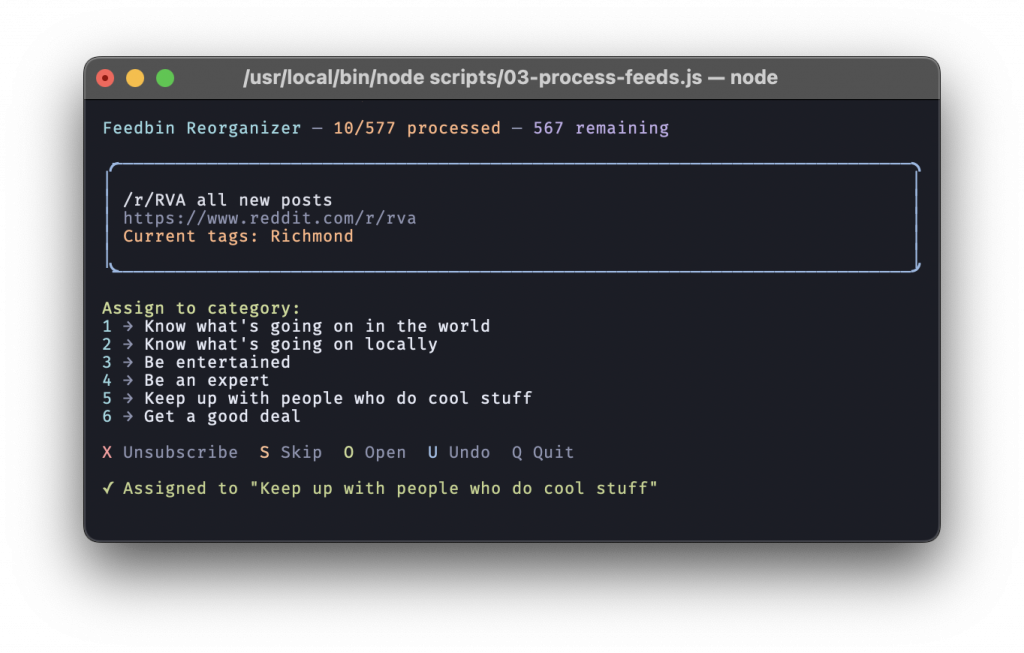
Processing close to 600 feeds took a handful of hours in front of the TV.
The first stage of this process slurped my current subscriptions into a sqlite database. (Did you know that Node has built-ins for sqlite? I didn’t!) This way, if I decide this sucks, I can run the operation in reverse and flip it back.
